This is it. The big launch week for The Watch & Wand and a few wonderful members of the blogging community have been nice enough to help spread the word.
I’ve turned off comments on this post but would encourage you to click on the link at the bottom and maybe poke around on some of the other posts you see there.
From time to time we like to feature insights by other authors here on the blog. This time, Allie Potts, a friend of the blog and victim of our internet show Writers Off Task With Friends, pays a v…
I love sharing everyday stories and finding their lessons, but sometimes I feel compelled to share a lesson you can find a use for almost every day. This is one of those times…
I’m a little behind on my television viewing at the moment (it’s the downside of trying to get a book ready for publishing), but all work and no play makes Allie a dull girl. Therefore I managed to squeeze in an episode of Saturday Night Live a few days after it aired. Unfortunately for me, most of the episode proved to be like eating a bland cookie when you are trying to diet (nice to look at, but not worth the calories) with the exception of one featured short film toward the end.
The film was about a person who has grown obsessed with the font chosen for the film, Avatar called Papyrus. Or rather it is about the person’s obsession about why that particular font, out of all the fonts available, was chosen “like a careless child,” for such a marquee event.
My husband looked at me as the joke continued to play out for the next three minutes. “This must be for people like you.”
By ‘people like me’ he meant people who respond to every school presentation whether it be the PTA’s fundraising plans, faculty procedures, or a teacher’s syllabus, due to letters projected on the screen being written in Comic Sans like Joan Crawford (played by Faye Dunaway) seeing wire hangers in Mommie Dearest. (I wish I could say I was exaggerating, but I am not.)
People who understand that fonts can set the tone as much as any background art.
People, whose fixation on fonts has the potential to topple governments.
Yes. Seriously.
This summer it was revealed that the daughter of Nawaz Sharif, the Prime Minister of Pakistan, allegedly forged documents downplaying the involvement in a London real estate deal after the legality of the family’s income sources were questioned.
How was it determined the documents she presented were forgeries?
People who can be called designerds (emphasis on the nerd), as I saw one fellow font-ficionado dub herself.
In other words, font selection matters. Maybe not to you, but it does to someone out there in the audience (and effective presentations are all about the audience), so pick your fonts with care and use them wisely.
Some tips to keep in mind whether you are writing a book, making a poster, or creating a presentation for work:
Sans Seriffonts are easiest to read from far away, such as on a poster, or in fine print because they have a uniform thickness. (Examples include Helvetica, Avant Garde, Arial, and Geneva)
Serif fonts, however, are easier to read as bulk text close up on a page because their distinctive shapes help our brains identify the letter faster, therefore costing less brainpower to process. (Examples include Times Roman, Courier, New Century Schoolbook, and Palatino)
Distinct\Display\Decorative fonts are highly stylized or highly decorative and are eye-catching and mood setting, but can be hard to read. They make the reader use extra brain power to process, so use sparingly. It’s also best not to use more than one distinct font at a time. (Examples include Jokerman, Stencil, Curlz, and Chiller)
Different fonts can be used together on a single page, but don’t use more than two or three. (This is unless you are writing a children’s book).
While most people can get by utilizing default fonts available on a computer, you can always add more. Word of caution – not all fonts are free to use in every format. Some require licensing for their use the same as stock art or custom photography.
some fonts may be unsupported on this viewer
Also, I do not recommend utilizing non-standard fonts for editable documents that will be distributed electronically unless you are tech savvy enough to know how to embed the typography into the document itself. Otherwise, the recipient might see nothing but squares on their end.
That being said, if you still would like to up your project with flashy letting, my favorite site for collecting new fonts is www.fontsquirrel.com. In addition to having a large selection of typography to choose from which you can test drive before downloading, it has a font matching tool. See a font you like? Upload an image and it suggests a number of similar fonts.
Overwhelmed by options? You can also find a short list of some of the best at The Creative Bloq.
Or keep it simple. You can do a lot to set your text apart with a single font by changing its size, weight (normal, bold), spacing, or style (italics). The choice is up to you. Just don’t choose Comic Sans for the body of your text.
To-do lists can be so cute when they are young. When they look at you with those big shiny eyes, begging for your attention, you can’t help taking them home. As you stroke its fur and listen to it emit those adorable sleepy sounds of contentment, you can’t help think of all the wonderful things the two of you will accomplish together.
Then one day when you aren’t paying it enough attention, it piddles on the floor or gnaws a hole in your favorite shoes. Your sleep gets interrupted by late night whimpers or whines demanding your immediate attention. It nips at your fingers with sharp baby teeth and scratches your legs with its razor-sharp claws.
But you let this behavior go. It’s a baby to-do list after all. Mishaps happen. It’s annoying, yes, but all part of the process. You tell yourself it’s no big deal.
The next thing you know, that baby is one hundred fifty pounds of pure muscle more capable of taking you on a walk than you are taking it. The floors are ruined as is the couch, the blinds, and the contents of your closet. You stop having anyone over, too embarrassed to let them see what your list has become. You dread leaving your home, worried about what mess it’ll make while you are gone. What if it gets out? Even worse, what if it finds another list out there and multiples?
It growls at your family. It snaps at your dreams and each day you do nothing your to-do list only grows larger, meaner, and more wild. It’s no longer annoying. It’s quality of life affecting.
You might be tempted to take the to-do list out to the woods and be done with it, but then you remember back to those eyes and the sweet little baby it once was, and you decide to give it one last chance, but deep down you know something has to change. That something is you.
It’s time to take control and tame that unruly beast.
Step 1: Put that list on a diet.
If you aren’t sure of your to-do list’s ideal weight, ask a trusted friend, but chances are you have been feeding it far more than is healthy. Start by cutting back on the filler treats that might make you temporarily feel good, but in truth don’t provide any nutritional value, like agreeing to judge a hot dog eating competition at the local state fair when you also have three missed deadlines already and no experience in the world of professional competitive eating.
Focus instead on limiting your list to three to five lean but high-quality meaty goals and keep your list active with plenty of exercise. Once your list is back in a manageable weight class, you can reintroduce the snacks provided they remain in moderation.
Expect whining from your to-do list, especially in the beginning as it is used to getting its way, but remember its reign over your house is over. Spray bitter apple on things that shouldn’t be chewed. Invest in a fence or limit its range to only certain rooms. Purchase a timer or create a schedule. However you set your boundaries, make sure they work for you because once set, you’ll need to remain firm and let what doesn’t make the list go. As long as you don’t mind the language, I recommend reading The Subtle Art of Not Giving a F*ck: A Counterintuitive Approach to Living a Good Life (affiliate link)
Step 3: Enlist the help of a trainer
Your to-do list just knocked over Grandma Maude’s vase with its tail. I get it. Adding more books to read to your list isn’t helping. You’ve maxed out on what you can do alone. If this is the case, I recommend finding an accountability partner. This can be a friend, spouse, colleague, or even a random person you’ve stalked built a relation with online (facebook groups related to your interests are a good place to start). The ‘who’ doesn’t matter. What they do, however, does. This person should be able to regularly help identify priorities and be trusted to hold the leash with a firm hand when your to-do list starts pulling away as it is apt to do.
Step 4: Reward your progress
Asana Screen Shot
Positive reinforcement works wonders. Just as a dog can learn to associate the sound of a clicker or over-the-top expressions like “whose a good girl/boy? You are!” as praise, your list will respond to seeing tasks getting checked off. Treat each check mark like a big deal it is. If you prioritized your tasks properly, they will be. Don’t keep your accomplishments in your head. Write them down and display them for all your family to see.
Some people might be comfortable working from a scratch pad or a pile of post-it notes, but I prefer using an app like Evernote,Trello (affiliate link to tell them Allie sent you) or Asana. All have desktop and mobile versions as well as limited, but free-to-use plans. I also like these tools because it makes it easy for me to share my list with my accountability partners, set due date reminders, and upload files related to a task, so pulling it all together later is one task I don’t have to add to a list.
Step 5: Accept accidents will still happen
No matter how well-behaved your list becomes, its heart is still that of a wild beast. Accidents, like forgotten commitments and missed due dates will still happen. Don’t rub your list’s nose in it. Don’t dwell on the failure and whatever you do, if your goals are important enough, don’t ever give up.
If you’d asked me a few years ago if I had any addictions, I would have said no. I told myself I didn’t have an addictive personality. It turns out I just hadn’t found my drug of choice – photo editing apps.
Like any drug dealer, these developers hooked me with the easy fix. Here – try this free download, it will turn your photos into amazing pieces of art in seconds. And boy, did it ever. Soon I was applying effect after effect to my favorite photos, but there was a problem. I liked too many of the results. I got into the habit of saving multiple versions of the same image, albeit with different styles, rather than just stopping at one.
As my camera roll filled up, I tried to regain my self-control. I forced myself to only save the best of the best. Unfortunately, this created a whole other problem. I wouldn’t save anything until I’d applied and seen everything. Over time, seeing the same effects applied over and over, I grew less impressed with the results. Sure, the app would release a new style now and then, but it could no longer keep up with my desire for a new, bigger, wow factor – for more, more, more.
I realized my one source for fun with photography was no longer enough to satisfy my needs. I decided to venture into a place I knew could provide more. I joined Instagram.
Suddenly, I found myself taking photos of the most random things. An empty park bench. A rusted bridge. Cherry blossoms separating me from a brilliant blue sky. My kids, long used to their mommy whipping out her phone to capture the moments of their childhood wondered why the lens was no longer exclusively focused their way. ‘Mommy might need this for her website or for a book cover,’ I’d reply, somewhat embarrassed.
My kids don’t read my blog, or they might wonder why they haven’t seen much crossover yet.
I may be a lost cause now, but I thought I should provide a list of free apps to avoid in order to protect yourself from a similar fate.
Prisma (www.prisma.com)
Simple as pie artistic effects
This was my gateway app. Once you grant the app access to your camera and your photos, all you have to do is select or take a photo and then press a single button to apply an artistic effect which makes your photo look like it was painted in the style of an artistic master. My personal favorites are the Gothic, Candy, Dreams, and Composition styles, but there are plenty of others to choose from. You can also control the intensity of the style with a finger swipe.
When I originally downloaded the app, it automatically cropped photos into a square image typical of what is posted to Instagram, but now allows for a full-screen image. Additionally, Primsa has launched their own social sharing site.
If realism is more your thing, but you still like to add some oomph to your photos, Canva and PicMonkey both offer filters to adjust lighting, contrast, color, and intensity. However, both have their limitations, especially for the free versions. I use Canva if I am trying to also incorporate clip art, stock photos, or text. I used to use PicMonkey if I was trying to soften, sharpen, focus or otherwise add a zoom effect to a photo, but they’ve taken steps in the last few months to make more and more of their better features only accessible to premium users.
You may be more familiar with Adobe Photoshop and Illustrator, both of which are a far cry from being free, but Adobe also has a few ‘lighter’ apps which are powerful enough. Even better, you don’t have to have a paid creative cloud monthly subscription to use them.
So far I’ve used Adobe Photoshop Fix, Adobe Photoshop Mix and Adobe Spark Post.
Photoshop Fix
AfterBefore
This app does what it says. It can fix your photos via subtle tweaks. With built-in face detection, it can instantly smooth those pesky wrinkles away, boost your smile, and remove unwanted composition elements such as logos on t-shirts or photo bombs such as bunny ears through its spot healing tool.
Photoshop Mix
This app is designed to make it easy to swap out backgrounds or merge multiple images into a single composition. Want to make your friends jealous with an impromptu trip to an exotic destination, but short on funds? Simply take a picture of yourself lounging on your couch and replace it with a beach front chair.
Actually, it’s not quite as simple as the tutorial would lead you to believe. You have to pay extra care as you trace around the image you want to keep otherwise your results, with their jagged digital edges, will scream photoshopped. After spending far too long with less than ideal results, I recommend leaving this trick to the professionals.
Spark Post
If you are editing for a blog post or social media post, this tool packs some serious punch. I specified my preferred image size and uploaded a picture. The tool automatically suggested a color palette for my text based on the background image. From there I was able to change out layouts, adjust filters, and even add animation to my text with a few simple button presses. The only issue I had with the app is that it adds a watermark to the bottom of your graphic unless you also ‘share’ it with a friend.
Today I am visiting with Chris Graham, The Story Reading Ape, talking about formatting books for print using Microsoft Word. For those who aren’t as familiar with Chris, I encourage you to check out his site – not just because he was kind enough to turn it over to me for a bit but because it is full of great information about the indie publishing industry as a whole, author highlights, as well as jokes anyone in any profession could enjoy.
I know that not everyone who reads my blog is an author, aspiring author, or uses Microsoft Word, but I hope that you might still be able to find a time-saving tip or two you can use in the future.
You’ve been toiling for hours upon hours. Edited to a glossy shine, your manuscript is finally complete. Unfortunately, a complete manuscript is not the same thing as a book interior. The difference…
This site contains affiliate links, which means I may receive compensation when you click on a link to a third-party site. I am also a participant in the Amazon Services LLC Associates Program, an affiliate advertising program designed to provide a means to earn fees by linking to Amazon.com and affiliated sites.


 This is it. The big launch week for The Watch & Wand and a few wonderful members of the blogging community have been nice enough to help spread the word.



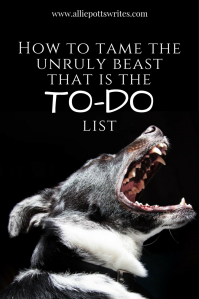 To-do lists can be so cute when they are young. When they look at you with those big shiny eyes, begging for your attention, you can’t help taking them home. As you stroke its fur and listen to it emit those adorable sleepy sounds of contentment, you can’t help think of all the wonderful things the two of you will accomplish together.
 If you aren’t sure of your to-do list’s ideal weight, ask a trusted friend, but chances are you have been feeding it far more than is healthy. Start by cutting back on the filler treats that might make you temporarily feel good, but in truth don’t provide any nutritional value, like agreeing to judge a hot dog eating competition at the local state fair when you also have three missed deadlines already and no experience in the world of professional competitive eating.
 Expect whining from your to-do list, especially in the beginning as it is used to getting its way, but remember its reign over your house is over. Spray bitter apple on things that shouldn’t be chewed. Invest in a fence or limit its range to only certain rooms. Purchase a timer or create a schedule. However you set your boundaries, make sure they work for you because once set, you’ll need to remain firm and let what doesn’t make the list go. As long as you don’t mind the language, I recommend reading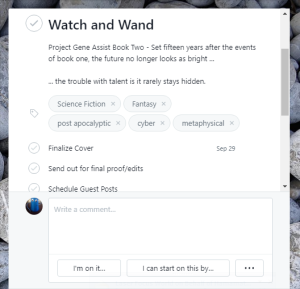

 If you’d asked me a few years ago if I had any addictions, I would have said no. I told myself I didn’t have an addictive personality. It turns out I just hadn’t found my drug of choice – photo editing apps.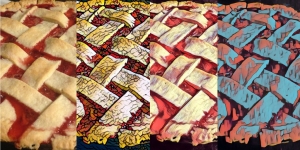
 If realism is more your thing, but you still like to add some oomph to your photos, Canva and PicMonkey both offer filters to adjust lighting, contrast, color, and intensity. However, both have their limitations, especially for the free versions. I use Canva if I am trying to also incorporate clip art, stock photos, or text. I used to use PicMonkey if I was trying to soften, sharpen, focus or otherwise add a zoom effect to a photo, but they’ve taken steps in the last few months to make more and more of their better features only accessible to premium users.


 Allie Potts