That Vs Which: Self Editing Tip and Reason Number 501 Why it is taking so long to finish my next novel

I do not blog daily – my hat’s off to those that do – but that doesn’t mean I wasn’t happy enough to receive The Writer’s Daily Companion by Amy Peters as a gift several months ago. It’s like having my own daily prompt generator without the distraction that is the internet.

Somedays it’s a story prompt. Other days it is more of a workbook for improving your writing. For example, one of the Daily Companion’s lessons of the day was the difference between that and which.

It’s been a while since I published my first novel, An Uncertain Faith, and though I don’t obsess over the reviews nearly as much as I once did, I have never forgotten one review suggesting my writing could be removed if I didn’t use quite so many ‘thats.’

Imagine that.

To be clear, I was very appreciative of that particular feedback. Until I read that review, I had no idea that I said and wrote quite so many thats. Of course, now that it’s been pointed out to my attention I see that the reviewer might have a point. Then again, when you are writing books that are supposed to contain tens of thousands of words, it should be understood that a few words might just be repeated.

I also know my other half will forevermore lovingly point out future overuses of the word that – much to my dismay and embarrassment. (To be fair – I probably have it coming)

The tip is to remove the word that from a sentence. If it doesn’t make sense, the ‘that’ stays in. If it does – leave it out.

To be clear, I was very appreciative of particular feedback. This sentence doesn’t work. Therefore – hurray! I get to leave the ‘that’ in there.

Therefore, if I follow my own tip, I should edit my paragraph as follows:

To be clear, I was very appreciative of that particular feedback. Until I read that review, I had no idea I said and wrote quite so many thats. Of course, now it’s been pointed out to my attention I see the reviewer might have a point. Then again, when you are writing books that are supposed to contain tens of thousands of words, it should be understood a few words might just be repeated.

It’s better, but the next thing to obsess over is whether the word ‘which’ might be better.

That is a restrictive clause, while Which is an unrestrictive clause.

Clicks on the image will take you to an affiliate link

For non-English majors like myself, this means asking yourself if the sentence would still is accurate if you were to cut out any text following either qualifying word.

for example, if I cut out the “that are supposed to contain tens of thousands of words,” the last sentence of my paragraph would read like this:

Then again, when you are writing books, it should be understood a few words might just be repeated.

The statement is truthful and accurate. Therefore, my edited paragraph is:

To be clear, I was very appreciative of that particular feedback. Until I read that review, I had no idea I said and wrote quite so many thats. Of course, now it’s been pointed out to my attention I see the reviewer might have a point. Then again, when you are writing books, which are supposed to contain tens of thousands of words, it should be understood a few words might just be repeated.

The downside of this tip is I have to go through my work in progress with a fine-toothed comb, in order to tighten my writing before I send it off to the professional editor. This has been no quick and easy process. But I have to say the reviewer who first gave me the tip has a point (and thank you to all who have ever shared a review) and I look forward to being on the other side of edits soon.

And that’s all I am going to say about that.


How to quickly add some serious credibility to your business or your brand

How to quickly add some serious credibility to your business or your brand - www.alliepottwrites.comI love quotes. I love reading them. I love using them in my posts as a way to flavor my thoughts with another voice. The trouble is it sometimes takes me ages to find the perfect complement to whatever topic I happen to be writing on at the time.
Then there are the follow-up problems.

How to determine whether a quote is legitimate or not and who really said it? Take for instance the story about the valedictorian in Kentucky who attributed a quote in his commencement speech to one US president only to change its source moments later as a joke that wasn’t viewed as funny by some members of the crowd.

Stories like that prove that no matter how meaningful, empowering, or thought-provoking a quote’s message is, the quote’s mouthpiece also matters. So I try to be careful how I use them.

“With great power, comes great responsibility” – Spider-Man’s Uncle Ben (or was it?)

Up until now, my go-to source has been sites like www.brainyquotes.com and www.tinybuddha.com for when I am need of some additional zen. Both sites have nice keyword searching functions and I’ve created more than one post based entirely on a quote of the day, but there is no way of knowing for sure that the person cited is the first person (on record) to have ever said it. Hence the follow-up homework problem.

I have since found a new way to incorporate direct quotes straight from the source into the world of my other writing jobHARO. HARO stands for Help A Reporter Out (www.helpareporter.com) and it is a free tool for journalists (bloggers, podcasters, and authors too) that helps you find potential sources for upcoming articles.

The rules for journalists, bloggers, and podcasters are pretty stringent as they require your website or media outlet have an Alexa (yes, Amazon’s Alexa – because she’s EVERYWHERE) rating of 1 million or less. This score based on your site’s traffic. However, authors can use the tool to find sources for their books without a media outlet, but it can only be a request for less than 300 words and you must have an estimated publication date as well as a publisher (though I didn’t see anything that said it couldn’t be self) to be considered.

Sadly though, there is no “student” reporter program.

However, if you do meet their guidelines all you do is submit a query outlining your question, what you are looking for in a source, and when you need a response back. You need to be as specific as possible when describing your preferred expert to ensure you get the best sort of response for your platform or outlet. Once your query is approved by HARO, it is then sent out as part of several email blasts that go out throughout the day.

Help Wanted
image courtesy of http://www.flickr.com

But guess what, you don’t have to be a rockstar journalist or multimedia darling.  To use HARO to earn some extra cred for your book, business or brand, all you have to do is sign up as a source.

“And so it became that the quote lover became that which she loved: the quoted.” – so say I, from the book of me

The downside of signing up for the service as either a journalist or a source is the number of emails. There are so many emails. Three per day, and opting out is a frowned upon. But all those emails are filled with reporters just begging for potential interviewees, which are then broken out into various categories. HARO also offers paid plans to help filter by keyword if the emails start to get to you.

While you, as a source, can’t pitch your book, blog, or business outright, you can position yourself as an expert in your field based on how you answer the reporter’s questions. Then if your answer, or pitch, is accepted, you can get featured giving you access to a much larger media outlet, and access to your potential target audience without having to know a guy who knows a guy who knows a gal who used to babysit for the local section’s current editor.

Oh, and at a maximum of 300 words, it is a lot easier (and faster) to do than guest posting.

Though, seriously if you want to write a guest post sometime, that’s cool too.

How to support an indie author for free – a first experience with the Kindle Scout Program

A way to support #indieauthors for free and an Introduction to #KindleScout - www.alliepottswrites.comThis is the launch week for a young adult science fiction book called Joan the Made written by Kristen Pham. While I always enjoy celebrating my fellow indie author’s bookbirthdays, this one is special as it is the first book I helped bring to market through Amazon’s Kindle Scout Program.

I say that like I put in a lot of work.

For those who aren’t as familiar with the ever mysterious world of independent publishing, the Kindle Scout program is a way for authors to get a little financial and marketing boost from the all mighty Amazon without sacrificing all their creative control or signing away their rights for future works in the worlds they create under the guise of non-compete terms.

As I am still in the midst of rewrite, I have yet to try my hand at gaining access to the program with one of my own books, but that didn’t prevent me from seeing first hand what it can do for others.

Enter Kristen.

A few months ago, around the time I was launching my last book, I discovered she’d uploaded a sample of her latest book as well as it’s cover to Kindle Scout. Now all she needed was nominations. I read through the description:

On Joan Fasces’ eighteenth birthday, she discovers that she is cloned from the famous Joan of Arc. But being cloned in America comes at a steep price. Segregated and oppressed, clones are forced to act as docile servants to the rest of the Evolved population. Joan can either run from her fate and spend the rest of her life in hiding, or she can join a Throwback rebellion populated by clones of the greatest leaders in history.

I was intrigued.

I opened the sample. The first chapter caught my attention. I am a sucker for dystopian young adult, even if I know there is bound to be things like a selection ceremony gone wrong and an angst-laden love triangle. Tropes are tropes for a reason. I saw nothing in those sample pages to make me think this book was unworthy of being considered by the powers that be. (I also happen to know that Kristen has had a short story selected as a top ten submission on Wattpad by Margaret Atwood so it was an easy bet.) I pressed a button – Nominate Me.

That’s it.

Image is an affiliate link

A few weeks later I received an email from Amazon informing me that Joan the Made had been selected for publication. Yay for Kristen! A few weeks after that I received another email from Kindle Scout. They were sending me a free advanced copy of the e-book. Yay for me!
I also saw that I’d been given a Scout Score. 10 points for nominating a book. 10 points for having a book I nominated get selected for publishing. 20 points for redeeming my free book. They weigh these points like redeeming the free stuff is the harder part.

Unfortunately, I did not think to sign up for the program using the email associated with my Amazon account which meant, I would not be able to gain an additional 40 points for reviewing the book. Oh, well. I’ve reviewed it anyway, noting I’d received an advance copy as is proper, but my review doesn’t show the coveted verified purchase tag. The unverified status of my review was one of the exceptions.

I noticed that she’d already amassed close to 30 reviews on the US Amazon site, even one from an Amazon top reviewers, and the book wasn’t even live yet, providing authors aren’t the only ones benefiting from this program. I, on the other hand, am still begging and pleading for reviews months after publication. Clearly, once again, I’m doing things the hard way.

I’m not sure how well it would work for later books in a series, but overall, based on what I have experienced, it is a program I will have to seriously consider when its time for me to branch into something new.

Until then – nominate, read, review, and repeat. It’s free!

You may just make an authors year.


Follow-up note: Within days of posting this I received the following note from Amazon: “April 3rd, Kindle Scout will no longer accept new submissions, and you will no longer be able to start a new Kindle Scout campaign. Once the current campaigns end their voting period, you will have until May 31st to log into your Kindle Scout profile, redeem free copies of your selected nominations, and save any info you may want.”

This is obviously disappointing as it was a neat way for emerging authors to gain additional reviews and exposure. I’ll update this post if and when I hear of any potential replacement for the service.

How to amaze friends and edit images for free with Sumopaint

How to amaze friends and edit images for free with Sumopaint - www.alliepottswrites.com #graphicdesignEarlier this year I featured a mock-up movie poster based on a conversation I’d had with my youngest son. The image produced more comments than anything else I’d published that day. It was a good reminder as to the importance good visuals play in getting a message across.

In full disclosure, I created that image using the Adobe Creative Suite of products, which are powerful, professional grade tools, however, I wanted to find out if I could create similar images with easier to use (and less expensive) applications. Because – why not?

My selection criteria

  • Must be able to use masks and layers – This eliminated Microsoft Paint (to be fair, Paint was never really in consideration)
  • Must be able to edit photos (meaning change colors, erase bits, etc. not just add filters) – This eliminated Canva
  • Must be able to upload as well as download edited images without a subscription – This eliminated PicMonkey

For those of you unfamiliar with the terms above, layers allow you to move and edit isolated elements of a design while masking aids with an element’s transparency and shape.

The experiment

I found Sumopaint and clicked on it’s “Try Online” option. (Note – Sumopaint does require Flash so may not be available on all devices)

SumoPaint Screen ShotI expected another window to open, but instead, a screen similar in appearance to Microsoft Paint appeared at the bottom of my browser window.
For the purpose of this trial, I planned to add and edit multiple image layers, adjust transparency (opacity), add text, and alter an image’s size and shape (free transform tool).

Now, I had to upload the first image to edit.

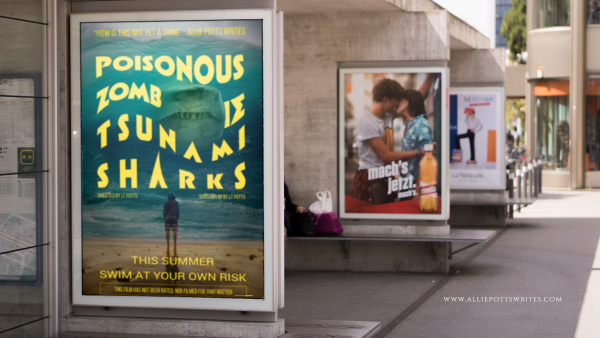
I found a nice background photo from www.pixabay.com showing a number of posters hanging in a row. I then used the File>Import To Layer Command to import my mock movie poster for Poisonous Zombie Tsnumani Sharks. SumoPaint automatically created a new layer.

My poster was originally larger than the background. I resized it using CTRL+T which is the shortcut for the Free Transform Tool.

I recommend you resize your image immediately upon import as SumoPaint has a tendency to crop out anything exceeding your window otherwise.

How to amaze friends and edit images for free with Sumopaint - www.alliepottswrites.com #graphicdesign

I wanted my poster to go where the map was in the original image, but I also wanted it to look like it was behind the frame.

I moved the layer with the Poisonous Zombie Tsunami sharks to the back so as not to mess it up as I worked on the map.

I selected the layer with sidewalk frames and used the eraser tool. Unfortunately, rather than creating a transparent area as I expected, this resulted in a white area.

Ultimately, I was able to find a workaround by selecting everything in the background image except the white area where the map had been and copying and pasting it as a third layer.

A little decrease in brightness here, a little blur there, and a little more adjustment using the Free Transform>Distort tool and voila.

The results

How to amaze friends and edit images for free with Sumopaint - www.alliepottswrites.com #graphicdesign

Having passed my initial test, I decided to try out some of SumoPaint’s additional features such as its filters, color, and text adjustments as well as layer effects resulting in some other mock-ups.

How to amaze friends and edit images for free with Sumopaint - www.alliepottswrites.com #graphicdesign
The planet was created with gradients and 3D filters
How to amaze friends and edit images for free with Sumopaint - www.alliepottswrites.com #graphicdesign
The scales were made using a rock texture which I then recolored
How to amaze friends and edit images for free with Sumopaint - www.alliepottswrites.com #graphicdesign
The font for the title is Impact which I then stretched for well… um… greater impact.


Of course, now I want to write the books to go along with all these covers, but that is a problem for another day.

Final Review

Things I like:

  • Can’t beat the price
  • The learning curve is relatively short (compared to Adobe Creative suite)
  • The User Interface was relatively straightforward and easy to navigate
  • The built-in filters can be customized for a unique look
  • Colors and gradient maps can be added and adjusted with a click of a button
  • Text can be stretched, warped, or otherwise transformed, giving it an edge over most other online editing tools

Things I didn’t like:

  • Text can’t be edited once you have released a text box
  • I couldn’t find a way to make the background transparent once an image was loaded short of adding a new layer and deleting the old
  • Layers would only allow for a handful of text boxes before the program became buggy.
  • When transforming an object, the object automatically reverts to 100% opacity until the transform is completed which is problematic if you are trying to distort an object so it matches the shape of something behind it
  • There are no rulers or align tools so object placement requires some guesswork (Canva has a clear advantage here)

While Adobe still remains the gold standard in my mind, it is good to know I have another option when I need to perform quick and easy edits on the fly, and now I hope, so do you.


How my blog gained its first sponsored content – it was simpler than you might think

How my blog gained its first sponsored content - www.alliepottswrites.comMy story begins in June in London.

I was there to participate in the Bloggers Bash, an international meet-up and conference for bloggers from all walks of life. Suzie of Suzie Speaks approached the front of the room. I’d followed Suzie for a while, I knew she’d walked away from a teaching career and had begun blogging professionally out of necessity as much as interest. I’ve applauded her courage, admired what she’s achieved and was thrilled to finally meet her in person.

I opened my notebook as she began her presentation eager to record all the secrets of the professional blogging universe. Then she said something that made my note-taking hand pause in mid-motion.

Size doesn’t matter…

I blinked. I looked around the room. Light shone down through stained glass windows depicting images reminding me I was far from home. I couldn’t have heard that right, I told myself. It must have been the accent, but did she really just say that a blog of any size (or style) can gain sponsors? Even one like mine?

Well, yes … just don’t expect them to call you first.

Emboldened, I set out to try to find a sponsor.

Earlier, I’d joined Massive Sway where I published a guest piece on logo design through their sister site, The SITS Girls, so I knew they provided a list of companies looking to amplify their reach through social media and were willing to pay for it. All I had to do was fill in a profile detailing my interests and list my social media links. Then they would send me a list of companies willing to pay for posts, tweets, or other social amplification.

Dog condiment coat
Her Royal Highness was not amused. (affiliate link)

For example, one campaign listed was for a flea collar and all you had to do was purchase the product, take a picture or two with your furry family member and write a story. I have a dog, neither of us like fleas and I write stories. It was perfect.

Except for one catch. You had to be on Instagram too.

I wasn’t on Instagram at the time (I am now). So, I let that opportunity pass me by, excited by the possibility that adding sponsored content would be easy, confident that more would come. The next one to catch my eye was for wine. Not a brand I was hugely familiar with per se, but I do enjoy wine. This was it. My first sponsored content … I hit the button to apply.

Then nothing.

A few weeks later I learned my application had been declined. My profile hadn’t been enticing enough to the brand. A red flag should have gone up the moment I thought it might be easy.

…It’s what you do with it.

It was disappointing, but as I read through more and more corporate pitches I realized something else. Just as I wasn’t a fit for that earlier company’s strategy by the numbers, many of the easy pitches coming my way weren’t a fit for me or this blog by the content either.

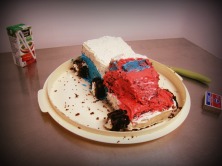
Pinterest fail truck cake - www.alliepottswrites.com
One of the many reasons I am not making a killing on Pinterest

My blog isn’t about handcrafted lipstick or yogurt made from the milk of a coconut, nor is it about hidden uses for deodorant or strappy sandals that perfectly compliment the color of your favorite cough syrup. (I’m sure that last one comes in especially handy.) I have nothing against those sort of sites. In fact, I use them all the time. This site just isn’t one.

I realized I had been going on about this all wrong. I was wasting time waiting for the ‘perfect’ opportunity to appear in my inbox when what I really needed to do was create that opportunity on my own.

As almost every business today has contact information somewhere on their website, I decided to use it.

How did my blog gain its first sponsored content?

Simple. I sent an email.

In it, I made my pitch which included the following:

  • Who I was
  • What I wanted to do to promote their product on my site (post length and content bullet points)
  • Where I was active on social media
  • When I would post
  • Why they should take me up on my offer, making sure to provide monthly blog stats, social reach, and audience engagement
  • How much my proposal would cost

I then prepared myself mentally for their response (because as an author I need more rejection in my life). I reminded myself I had nothing to lose and only acceptance or experience to gain.

And would you know it? We reached a deal!

All I had to do was ask.


For those who are interested, Suzie also offers help growing your blog and social media presence and really knows her stuff. And no, she is not paying me to say that (though she’s welcome to). This is just my way of saying thanks to her for giving me the confidence to take that first step.