Tent For Seven: Totally Not A Book Review

Amazon has rules. Rules about who can and cannot post a review. Rules about what you, as an author, can and cannot say about another author’s book in your review—unless you don’t mind getting all your reviews taken down. The appeal process isn’t exactly biased toward forgiveness either. So when I say this post is not a review, believe me.

But I want to talk about this book, and more importantly the authors behind it anyway.

Book cover for Tent For Seven featuring a tent, mountains, fire, and a smiling bear.

Full disclosure, the reason I cannot post an official review about Tent For Seven: A Camping Adventure Gone South Out West by Marty Ohlhaut and Grace Ly is because I am biased as heck. Their family is part of the village that raised me. Considering they were a family of seven at the time (they’ve since multiplied), one could say they were a large part of the village that raised me. I’m also biased, in part, because I knew the story behind the book before it was published, or at least, I thought I did.

Growing up, Marty Ohlhaut was Grace’s dad. He still is, but what I mean is I viewed him in the same way I viewed pretty much every one of my mom and stepdad’s friends—a grown-up. He was funny (also still is) but in the back of your mind you always knew that all it would take was one ill-thought-out leap down their sloped backyard, a broken planter, or similar misstep to get sent home with a call to your mother. In my case, those calls could result in a grounding (depending on the infraction) and a bye bye to my social life.

In other words, I didn’t know him outside of his parental persona. I certainly never guessed he was winging life as much as I was (am). The only hint I ever had of the person behind the parent was the time we were trying to make cookies and realized we needed maple syrup for the recipe, which we didn’t have. No problem, we’d go down the street and ask the neighbors for some.

The Ohlhaut children were happy enough to help (cookies were on the line!). They thought they had some extra syrup… somewhere. Where was it? Oh yes. Eventually, they handed us a bottle of brown liquid. Crisis averted! Cookies were in our future once again. Only, it turned out that bottle wasn’t filled with maple syrup at all. It was their father’s whiskey, cleverly disguised.

Our mistake was caught in time and no whiskey was wasted on children’s taste buds. We got a good laugh out of it, and I am sure that Mr. Ohlhaut gained a valuable life lesson from his children’s unquestioning generosity while also learning more about proper storage techniques for potent potables.

who needs a tent when a 1998 Coleman Mesa is available for rent?

Which brings me back to his book. If you have ever camped before (not glamped as I prefer to do, especially as I’ve grown older—actually camped) chances are you are already well aware that things often go sideways in spite of the best of planning.

Now imagine everything going wrong, in another country, without access to a cell phone, or really any civilization, for days. I can sense you shuddering from here. I know I did when I started reading their account.

Were you to cut your losses, pack it in, and go home while vowing to never step foot in the great outdoors again, no one would blame you. Instead, they pressed on, bolstered by the strength of their family. I say “they pressed on,” because while the book is Mr. Ohlhaut’s perspective, it is clear throughout the pages how much his wife’s support and his children’s positivity played a critical role in the decision to continue forward, no matter how much he tries to convince you it was purely about the logistics or finances.

This decision to keep traveling also puts them in the path of various people whose timely appearances will make you wonder how much can a person reasonably brush off as mere coincidence. As a result, even if I didn’t know the backstory, I would still highly recommend this humorous page-turner for anyone who enjoys inspirational, family-focused non-fiction, provided you are not triggered by bears or outdoor trauma.

Happy Camping!

So You Decided to Join Mastodon-Now What?

The future of Twitter is uncertain, leaving many to wonder where to take their social media addiction next. An alternative that has seen a massive upswing in registered users in the days following the announcement of Twitter’s new direction is Mastodon. While this service offers a similar platform for networking and sharing thoughts, it is not a drop-in replacement and does require a bit to get used to it. However, if you don’t mind doing a little homework, it can be an option for those who value connection over viral engagement.

As someone who has decided to start fresh with a new social network, here are some tips I found for making the process smoother:

find your club

Picture the stereotypical opening of any American film set at a college or university. In almost every movie, the main characters walk around a series of tables for the school’s clubs, fraternities, or sororities.

The students manning these tables are typically striking in their differences. You might see a group of pale darkly-dressed “goths” at one and a group of boisterous student-athletes at another. Both tables clearly have different aesthetics, rules for entry, communication preferences, and likely vastly different interests, and yet are both bound, at least at a high-level by their school charter.

This is how Mastodon’s servers work. Each server “instance” is like a club with an independent admin who sets the rules for who gets to join, how many people they want to support, and what they will allow people in the instance to post about. At the risk of taking my metaphor a little too far here, some admins are like Ravenclaw—they only want the academics, while others are Hufflepuff and will take anyone. However, both groups ultimately call Hogwarts home.

The list of available instances has been growing almost as fast as the number of new people on the platform. Luckily, there is a wizard to help you narrow down your options.

One word of caution—there is no such thing as a popularity club on Mastodon. If you are all about the quantity of followers and not the quality, this is not the platform for you.

Preview Posts

When you think you have identified the instance that best fits what you want to read, and post about most, give it a test drive by typing in the name of the instance into your search bar with “/public” at the end. For example, one of the many instances the wizard suggested I consider joining is wandering.shop based on my interest in science fiction and fantasy. By typing “wandering.shop/public” into my browser bar, I can see what sort of posts belong there and make a more informed opinion.

There are also groups for those with a passion for politics, programmers, scientists, and musicians. There are also generalist groups for those, like myself, who enjoy variety. Don’t worry too much about making a bad decision, you can always change what instance you join later if you find out that it isn’t the group for you after all.

Review the Rules

Remember how I said that each admin gets to set the rules? What you can and can’t post varies based on the instance you join. Some allow you to re-blog/boosts from other instances or share posts from your other social media platforms. Others don’t. Make sure you understand what is permitted and what will get you booted before you join.

Request Admission

Some instances let you join with just the click of a button. Others will require you to go on a “waiting list.” It’s up to the admin. While this might frustrate some people used to instant gratification, it’s not all that different of a process than what many Facebook group admins ask you to do to ensure that those who already belong in the instance won’t suddenly get spammed by self-promotion or riled up by angry trolls.

Also, if you consider yourself to be an influencer already, and likely to bring thousands if not millions of followers with you when you join, consider emailing the admin directly before requesting to join. Mastodon is run off of independent servers, which can crash if traffic suddenly skyrockets.

Create Your Profile

Creating a profile is much the same on Mastodon as it is on Twitter. You can add an avatar and header image and link your account to your website. (Fun fact, if your website plan allows it, Mastodon will give you a bit of code that will “verify” you are the site’s owner—no blue checkmark required). I’ve read that it is considered “cringe” by original Mastodon users to use one’s actual name and face as an avatar, but I did so out to help people moving from other platforms recognize me. (I also have a teenager now and am well used to being cringe).

set your preferences

Mastodon lets you set a number of preferences that aren’t options on other platforms. You can add filters, which will automatically hide posts that mention triggering words behind a content warning block, or you can open your feed up to hide absolutely nothing. You can set it to only show posts written in a single language or make your experience as multi-lingual as you are. You can even set time limits on how long the server should host your old posts.

Introduce Yourself

When you are all set to make your grand debut, write up a summary of your interests in a post using #Introduction. Feel free to pin this post to the top of your profile. Or don’t. Completely up to you. You can then build more connections by following others and sharing their content using the reblog/boost feature.

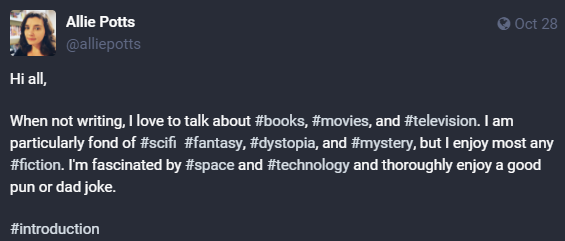
Screenshot of my initial introduction post which reads:

Hi all,

When not writing, I love to talk about #books, #movies, and #television. I am particularly fond of #scifi  #fantasy, #dystopia, and #mystery, but I enjoy most any #fiction. I'm fascinated by #space and #technology and thoroughly enjoy a good pun or dad joke.

#introduction

I will admit that joining yet another platform was not exactly high on my wish list, and I hate that I may have lost connection with some of my Twitter friends, but I’d like to think that our paths may yet cross again. In the meantime, I am enjoying the opportunity to make new connections, learn more tricks, and in some ways reinvent myself. If you happen to do the same, feel free to reach out and say hi. @alliepotts

5 Free Alternatives to Vellum – The Ebook Conversion Edition

Vellum Alternatives for Ebook Conversion - www.alliepottswrites.com

While downloading ebooks to your reader is simple, getting them up on the cloud in the first place requires some work. I write my books using Word, however, just because you can import your manuscript’s formatted-for-print-ready Word document into Kindle Direct Publishing (Amazon), doesn’t mean you necessarily should.

For example, you may want to include a table of contents in your ebook for easy navigation, but don’t want one in the print version, or you may want to include links in your ebook pointing readers directly to your other books, making purchasing faster. There are also other distributors besides Amazon that require a specific format for ebooks called epub. This leads me to the next step in the book publishing process – ebook conversion.

Vellum

Vellum offers formatting for print as well as ebook conversion. However, lacking a Mac or a bottomless checkbook, I’ve only been able to appreciate its service as a reader. I can tell it must be awesome to use though based on the number of books I’ve read featuring one of its telltale templates. Don’t get me wrong – it creates highly readable ebooks. I’ve just seen enough of the same decorative flourishes to recognize a Vellum ebook as soon as a chapter opens.

  • Pro: Super easy to use
  • Con: Costly at $199.99, it’s not available for non-Mac users (unless you go through a third-party service like MacinCloud), and your book looks like dozens of others making it more difficult for your author brand to stand out from the crowd.

Smashwords

Smashwords is an ebook conversion service and distribution channel. It is also one of the most difficult ebook conversion tools I’ve ever used. This is because Smashwords distributes your book to channels like Apple books, Kobo, and Barnes and Noble for you, and those channels may have slightly different requirements for an ebook’s file’s layout. Therefore, Smashwords is VERY particular about how your manuscript is formatted prior to releasing it to partner sites and works best with Word files. Fail their checks during the process they call “the Meatgrinder” and your book goes nowhere.

  • Pro: Converts to all major ebook formats including mobi, epub, and pdf for free. It also offers a tool for self-certifying your content does not contain certain taboo subjects, which increases the chance those who publish more risqué material can distribute their books to a larger audience.
  • Con: I am serious when I say this service is NOT recommended for people who don’t know how to use Word styles or are unwilling to read through an entire book of “style guides” prior to attempting to convert their file. There is a reason you can find people to hire on Fiverr to get your file ready for you. Also, once your book passes inspection, it is put up for sale without going through a secondary preview approval step. This means there is a risk your book could be published with typos or with a missing chapter as long as stylistically it fit within the Smashwords Style Guides.

It is worth however noting that Smashwords announced in February of 2022, that it has been acquired by competitor, Draft2Digital in March and that moving forward the company would operate under that brand name. This leads me to the next option:

Draft2Digital

Draft2Digital (affiliate link) is like Smashwords in that it is a distributor that also offers ebook conversion. However, it is much, much simpler to use. Upload your word doc, select a template, and then add in things like your social media links, mailing list link, or author page, and Draft2Digital spits out a book file you can either take and distribute through other channels yourself or distribute through them for a portion of future book sales.

  • Pro: It is fast, simple, and lets you download mobi, epub, and sample length versions of your ebook for free – even if you don’t distribute with them.
  • Con: Draft2Digital does not allow you to edit your file once it has been uploaded. Therefore, if you see a typo or a weird chapter heading, you have to go back to your original document, correct the error on the word doc and upload again.

As mentioned above, Draft2Digital and Smashwords are combining forces. Per their press release, the combined company will allow users to either take advantage of Draft2Digital’s existing, more user-friendly, but less customizable formatting tool for ebook conversion, or allow braver and infinitely more-patient authors the option of creating more unique ebook’s using Smashwords’ tool.

This merger will eventually make all Smashwords users, Draft2Digital (D2D) users, so if you are debating which of the two is best for you, I would recommend going ahead and signing up with D2D.

Kindle Create

Kindle Create is still somewhat limited in what it can do compared to some of the other ebook conversion programs out there. For example, there are only a handful of templates to choose from and it only exports a special non-mobi kindle-ready format. It also requires you to download the software rather than work online. However, it’s another free option that produces nice, clean ebook files, and unlike Draft2Digital, gives you the ability to tweak chapter headings or resize images without leaving the user interface.

  • Pro: It’s even easier to use than Draft2Digital, includes a kindle previewer tool that lets you see how your book will look on multiple device sizes, and free!
  • Con: It doesn’t export to epub or mobi file, which limits your ability to use it to create advance copies of your ebook that can be sent via email or service like ProlificWorks, Bookfunnel, or via email to early reviewers.

Reedsy

When you format a book with Reedsy (affiliate link) you have the option to either have them email you a print-ready file or send you an epub or mobi file you can then take to the ebook distributor of your choice. Like Kindle Create, you can edit your ebook’s appearance in the user interface, which is great, but its editing capability is limited compared to Kindle Create. For example, while you can correct a typo in your text without re-uploading, you can’t resize an image. I also had a very difficult time getting the program to properly format my character point of view sub-headings without messing up drop caps.

  • Pro: The ability to edit your book without leaving the user interface is a big plus over Draft2Digital the fact you can download in both epub and mobi is a great benefit compared to Kindle Create
  • Con: Reedsy does not allow you to select chapter-specific settings. For example, if you say you want to feature drop caps at the beginning of each chapter, the program inserts drop caps in every chapter—even in the glossary at the end, which can be distracting to the reader. Downloads aren’t as instantaneous as the other options either. You have to wait for an email and can only request a download every ten minutes. There are also only three templates to choose from. The service also makes it extremely difficult to delete a book from their service once it has been uploaded. You can archive it, but not delete it. Therefore, it is not recommended for those who aren’t yet sure they want to trust the security of other people’s servers with their manuscript just yet.

Calibre and Sigil

While you can technically use either of these programs by themselves, they really work best together. Calibre has the ability to take a Word Doc (saved as HTML) and turn it into epub or mobi file using the headers, fonts, or other decorative touches you specify. This makes layouts more flexible, and gives your books a more custom look than what you can do with the other programs.

Sigil is more of clean-up tool than a conversion program. You can import an epub file you created with Calibre or with any of the programs above (except Kindle Create as it doesn’t offer epub), then tweak it until it looks the way you want, giving you the ability to customize the files generated by other programs. It makes fixing those pesky typos that somehow managed to sneak past your edit process super fast once you get the hang of it, but until then…

To be clear, neither of these programs are for the technologically challenged, and both require some comfort with programming. Personally, I love Sigil now, but it was a hard-won love.

  • Pro: This combination gives you the greatest range of customization for your ebook’s appearance and both programs are free to us
  • Con: Both programs have a rather steep learning curve and may cause a person to shake their fist in the air, sob into the phone while wondering what they ever did to deserve such agony, or be driven to drink.

I am sure there are other programs out there, but these are the ones I’ve used the most. Now, one step done, one million other little things left to go.


Rocky Row Novels - www.alliepottswrites.com
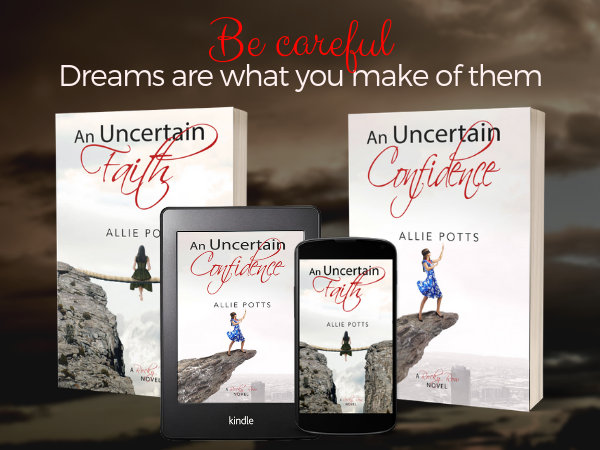
An Uncertain Confidence: Now available

Print Book Formats and Printing Options

The following is part three in my I Want to Self-Publish: Now What? series

print book formats and printing options

I love my kindle, but there’s nothing like the smell and feel of printed words on the page. That said, it takes a lot more work to transform a manuscript into something that people will be proud to display on their shelves than it takes to get your book into an ereader’s device manager. In addition, once you hit publish, your book is out there for all the world to see—typos and all. So if your publishing plan includes this format, be sure you are giving yourself ample time to get it done right.

Print Book Formats – Paperback vs Hardback or Hardcover

I will admit I take more pride in my collection of hardbacks than I do my paperbacks (shh – don’t tell them). However, the cost to produce a hardback is significantly more than the cost of a paperback, which means if you want to publish a hardback, you will have to charge your readers more to return a profit.

There are also significantly more service companies willing to help you produce paperback versions of your self-published book than there are print houses for hardbacks. As a result, as much as I love my hardbacks, I don’t typically recommend going through all the trouble of this book format unless you have an existing, proven fan base, plan to produce your book in bulk, which will help drive down the printing cost, or are publishing an illustrated board book for children.

Book Printers for Self-Published Authors

Once you have determined what kind of print book you plan to publish, the next step in the process is to find someone who will actually do the printing for you as most of us don’t have a professional-grade printer in our home offices with appropriate binding equipment. The available options will depend greatly on your physical location.

That said, a few of the options in the US include:

Kindle Direct Publishing (KDP): Amazon’s print book division used to be CreateSpace, but this separate organization has been dissolved and now print books are produced by the same organization that manages ebook production. The service does not charge any fees for book setup or revision, however, its hardback option is best for children’s books as it does not include a more traditional dust-jacket option, and limits its global distribution feature to only a handful of book sizes.

IngramSpark (IS): great for selling hardbacks on Amazon or paperbacks online everywhere else. This service allows you to print both paperbacks and hardbacks, supports a large variety of book sizes, and will automatically distribute your book to several online retail sites. However, it does charge a setup fee and a revision fee unless you have a promo code.

Blurb: I don’t have personal experience with this service. That said, they do offer paperback, hardback, and photo book print options and have a partnership with Reedsy (affiliate link), which is a company that offers a free print book formatting program, plus hosts a network of editors and cover designers. While there are cheaper options in terms of printing costs, this could make it a great option for authors who want to keep everything related to their book project in one place.

Lulu: This service is very similar to what you can get with Ingram Spark, but does not require a setup fee. It also, in my opinion, has a better print quality than what is offered by Kindle Direct Publishing, but it costs more to actually print your book with this service versus the cost of printing with either KPD or IS. This means that while you might save some upfront investment using Lulu instead of IS, it will actually cost you margin in the long run. Still, it is another option.

BookBaby: I’ve not used this service to date, but BookBaby offers both on demand book printing service as well as wholesale book printing. It, like IS and Lulu, supports both paperback and hardback book formats, and can help you with book editing, design, and distribution in addition to printing your book. It also offers high-quality white paper that is specifically beneficial for photobooks and yearbooks with three binding options.

Local Print Houses: If you plan to stock your own inventory for resale, it is also a good idea to call around to see if there are any local printers in your area offering book printing service. While these smaller, local printers may charge more by the page than IngramSpark, they typically offer more design and formatting assistant services than what you can get from the national printers without paying significantly extra, and offer the benefit of face-to-face consultation.

Print on Demand (POD) vs Wholesale Book Printing

If you prefer not to hold inventory and plan to sell your physical books online then you want to set up an account with a print on demand (POD) organization. All of the printers I mentioned above support POD, with the exception of the local print option.

If you plan on selling books at speaking events or tradeshows then you need to use a print service that supports wholesale book printing. This means that the printer will produce your book in bulk, which benefits you by driving the individual book’s print cost down and allowing you to gain a higher margin on the sale. However, this model does require you to take possession of a carton of books at a time, so you want to make sure you are either comfortable housing that inventory in your home or are extra confident in your ability to sell it at an event.

Wholesale book printing can also benefit you if you intend to sell to brick and mortar bookstores, but unless you are a well-known name in your community, these stores typically will only stock your book on their shelves under a consignment model. This means that you only get paid for your book when it sells, minus their portion of the profit. They also might limit how much of their shelf space they are willing to let you have. As a result, you might be better off printing 3-5 books at a time under a POD model instead of ordering a full carton.
Bookstores aren’t the only option when it comes to brick and mortar sells. If you want to see your book on retail shelves, but wouldn’t mind a little less literary competition, I would encourage you to check out a book called An Author’s Guide to $elling Books to Non-Bookstores by Kristina Stanley.

Which is the Better Strategy?

You may start noting a theme here, but it’s worth noting that nothing I’ve discussed at this point is an either / or situation. You can set up your books with Amazon for online orders and still set the same book up with another printer to take advantage of bulk printing options. This is an especially helpful strategy if you want to sell both online and in brick and mortar stores as many independent book shops will not stock books printed by Amazon, who they see as a competitor.


However, if you would prefer not to navigate through a number of posts, I have also consolidated the entire series into a single downloadable PDF, which you can access by clicking here.

Editing Tools For Writers

Writers, whether they pursue traditional publication under the writer-agent model, publish under their own name, or sign with a smaller imprint, need to edit their work prior to submission. However, while some authors believe their background makes them a grammatical expert, the truth is no one should rely on a single set of eyes.

Unfortunately, professional editing services cost money, and as most reputable editors charge by the word, the cost to help you polish a full-fledged novel quickly adds up. I understand the temptation to do without. That said, I’ve also spent more than I would like to admit on editing services for words that, upon hindsight, never stood a chance of making it to the final proof copy.

Thankfully, while no online editing tool or plug-in is good enough to replace a set of human eyes—for now, there are several programs on the market today that can help you identify more than the occasional typo. Many can now check for tone, misused words, readability, and even provide recommendations to help your pacing. Even better, many of them are offered for free or at a price point that is low enough to pay for itself in short order.

As a result, editing software programs are critical applications for every aspiring author’s toolbox and can help you bridge the gap between rough draft and editor ready. I’ve used dozens over the years, some with more success than others. To save you from making many of the mistakes I have, I’ve compiled this list of those I’ve found to be the best for fiction and non-fiction writing.

editing tools for writers

Grammarly

According to my Grammarly dashboard, the program has been correcting my text since 2015, so it’s a tool that has definitely impacted my writing. In fact, it has caught at least three errors in this paragraph since I started typing. That said, I’ve found the program misses errors occasionally when I’ve used it with Google Docs and I’ve had to disable it altogether on certain websites, like VistaPrint, as it doesn’t play nice with their text box editor.

Occasional bug aside, Grammarly has a free plan that works well as a spellchecker online via its browser extensions or as a Word plugin. However, there is also a premium version of the service, which can help you check tone, sentence variability, and make sure you aren’t inadvertently plagiarising online content.

Grammarly Achievements

  • Pros – It’s hard to beat free and is great for catching things like passive voice, incorrect punctuation, or misused homonyms in your daily writing. Plus, Grammarly sends out weekly progress reports telling you fun things like how unique your vocabulary is or how long you’ve kept your writing streak going which is great for staying motivated.
  • Cons – It’s much better suited for shorter business or online writing than creative long-form writing as it requires you to disable features like track changes in Word to operate.

ProWritingAid

ProWritingAid is another editing tool you can download and run as a plug-in with Word or Scrivener to check your writing or to check your writing online using its browser extension. Like Grammarly, its Chrome extension is free, however, in my opinion, its paid features, like its overused, cliche, echo, and consistency reports are well worth signing up for the premium version if you are a novelist.

prowritingaid reports

  • Pros – I can’t even begin to describe how much time this tool has helped me save looking for things like a missing quotation mark at the end of dialogue and identifying my clutch words and phrases. It is also more stable than Grammarly in certain web forms.
  • Cons – The plug-in for Word doesn’t always load correctly the first time, which has caused me to shut down Word and re-open my file on a semi-regular basis. In addition, the reports it runs can be somewhat overwhelming and do take a while to complete a check for a full manuscript.

Fictionary

Full disclosure, I am somewhat biased as I was invited to help test an early version of Fictionary, but I absolutely love what this program has to offer (they’ve also added a ton of extra features since then). Unlike all the other tools in this list, which I consider more copy-editing software, Fictionary is designed to help you automate a development edit.

To use it, all you have to do is upload your manuscript and tag where your plot points are located. Fictionary will then tell you if your pacing is too fast or too slow with a graphical representation of the story arc. It can also help point out things that can help strengthen your story like are the five senses represented in each scene of your writing, has a character gone missing from the story, or are you varying your openings and closings enough to keep your reader interested.

Fictionary Story Arc
graphical representation of the story arc from Fictionary.com

  • Pros – While I still put more stock in beta reader feedback than I do a computer program, allowed me to perform a proactive developmental edit before I risked my reputation or burdened advance readers with a two-dimensional story.
  • Cons – Fictionary advertises that it can help you evaluate and revise your manuscript against 38 story elements. This sounds like a pro, until you are actually ready to make all those edits. If you are a pantser rather than plotter, you may not have had a goal for each scene in mind related to the overall plot or may have included scenes you loved to write, but don’t serve any purpose. Tagging all these elements in the software can be overwhelming as well as time-consuming. It’s also not free, which is understandable given its value but does offer a free trial.

Hemingway App

The Hemingway App, also known as the Hemingway Editor is offered as either a online editing tool or as a desktop app designed around making your prose more like Ernest Hemingway’s. That is to say, it will help your writing get right to the point, which is clearly something I need more help with. The tool highlights sentences that it deems too long, identifies adverbs that are keeping you from showing rather than telling, and warns you about passive voice, and gives you a readability score which can help you better connect with your target audience.

HemingwayApp

  • Pros – The free online tool loads quickly and features easy to interpret color codes which change in real-time as you edit your copy. The paid desktop version also lets you publish directly to WordPress and Medium, making it a great editing option for serialized stories.
  • Cons – Not everyone is a fan of Ernest Hemingway’s style of writing. Was I forced to read 127 pages about an old man trying to reel in a marlin? Yes, I was. Did I enjoy it? No, I did not. Also, it does not integrate directly into other word processing programs, meaning you can use it to tweak your copy, but then will need to export it to Word, text, or PDF before you can do anything with it.

EditMinion

Before I bit the bullet and purchased the premium version of ProWritingAid, I used EditMinion to help polish up my work before sending it out for a professional edit. EditMinion is a completely free online editing program, that helps identify cliche phrases, passive voice, adverbs, and missing dialogue tags. However, it relies on copy and paste, and can only check a chapter of your text at a time.

EditMinion

  • Pros – It’s simple and you can’t beat the price point. Also, because there is absolutely nothing to download, you don’t risk corrupting your files or crashing other applications.
  • Cons – Copying and pasting each chapter one by one into the program can feel agonizingly slow, especially when you feel like you are so close to the literary finish line you can practically taste it. The tool also does not help your writing outside of the app or let you know if you have accidentally misspelled a character name. As a result, I use it when I need a second opinion but rely on the other products for heavier edits.

I am delighted to report I have reached the end of an editing project yet again and will be releasing my fifth full-length novel, Lies and Legacy: Project Gene Assist Book 3 to the general public in March 2020. You can read more about this series by visiting my Project Gene Assist book page, or by visiting your favorite online retailer to pre-order a copy.

Project Gene Assist Series Banner